
Click Pattern
The click pattern defines how strongly each beat is played.
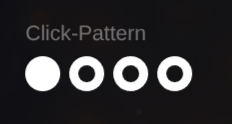 Click Pattern
Editing the Pattern
Section titled “Editing the Pattern”-
Click on the pattern visualization (dots) to open the Pattern Editor
-
Each beat can be set to one of three accent levels:
- strong
- medium
- weak (Pro)
-
Clicking an active step again disables that beat entirely
Auditioning the Pattern
Section titled “Auditioning the Pattern”- The small play button loops the pattern
- This allows you to shape rhythms by ear
- Looping continues while you edit
See also
- Mixer – balance click levels and accents for real use
- Pro Features on Blocks – pattern display & copy mode in the Player
- Presets – patterns are included in presets
- Song Actions – MIDI export includes pattern accents
- Block Editor Shortcuts – P opens the Pattern Editor